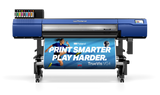








Click here for product brochure: DA-640 Datasheet
The DA-640 enables the user to control the media's surface structure through specialized Media, Ink, and Heat rather than building up layers of ink, thus creating richer finishes that meet industry professionals' expectations and demands.
- Create unique artistic impressions with inspirational dimensional embossing and exceptional image quality.
- New creative possibilities wide range of media and finishes, along with the ability to print on third-party media.
- Environmentally friendly and safe-to-use PVC-free media and low-odor, water-based inks.
- Easy-to-use, intuitive operation with great stability over long print runs.
- Includes and utilizes VersaWorks 7 for ease of use and operation, and introduces the new DG Connect Designer for easy art and design setup.
DA-640 Specifications
- Media
- Width:10.2 - 64in. (259 - 1,625 mm)
- Thickness: Max. 0.039 in. (1.0 mm) with liner
- Printing width:Max. 63.5 in. (1,615 mm)
- Ink Type : DIMENSE Ink 500 ml Cartridge - Order here
- Ink Colors: Four colors (cyan, magenta, yellow, black) & Structural Ink
- Printing resolution (dots per inch): Max. 1,200 dpi
- Dimensions:114.2 in. × 37 in. × 60.9 in. (2,902 mm × 942 mm × 1,548 mm)
- Included items: Dedicated stand, power cords, oven, media take-up unit, media holders, separating knife, replacement blade, cleaning liquid bottle for maintenance, drain bottle, User’s Manual, software
(VersaWorks, Roland DG Connect), etc.